FBR Digital invoicing (DI) is a mandatory in Pakistan for the registered taxpayers excluding salaried persons. It requires a real-time electronic invoicing system that connects POS, ERP, or billing software of businesses directly with the centralized fiscal system of Federal Board of Revenue (FBR). Every invoice your business generates is transmitted instantly and verified through the system.
Table of Contents
- Key Takeaways:
- What is FBR Digital Invoicing?
- Why FBR introduced it
- Who is required to integrate?
- Key Benefits of Digital Invoicing for Businesses
- Mandatory Invoice Fields
- Digital Invoice Vs Traditional Invoice
- Key Regulations you should know
- What happens if you ignore FBR digital invoicing?
- How does FBR digital invoicing actually work?
- What are scenarios in FBR digital invoicing?
- What you need for FBR Digital Invoicing Integration
- FBR digital invoicing compliance checklist (2026)
- How to start FBR digital invoicing – A Practical Integration Guide
- How long does FBR integration actually take?
- Why some integrations fail or delay
- How to Choose the Right Integration Partner for FBR Digital Invoicing
- What are the biggest mistakes businesses are making?
- Most common mistakes your staff can do
- Case example 1: Retail chain transformation
- Case example 2: Distributor going digital too late
- Case example 3: Global EPRs and International accounting software
- International ERPs, POS and Accounting Software are not compatible with Digital Invoicing
- Why international ERPs and accounting solutions are not directly compatible
- Practical Solutions for Integration – Market based practice
- How much does FBR digital invoicing actually cost?
- Digital invoicing for e-commerce and online businesses
- What should you do next as a business owner?
- The future of digital compliance in Pakistan
- Final thoughts: The shift you cannot ignore
- What comes next?
- Is your invoicing system FBR-compliant today?
- Frequently Asked Questions
- What is FBR Digital Invoicing in simple terms?
- Who must integrate with FBR Digital Invoicing?
- How much does FBR Digital Invoicing cost?
- What happens if I miss the deadline?
- Can I edit a digital invoice after submission?
- What is an IRN (Invoice Reference Number)?
- Do I have to use PRAL?
- What is the difference between sandbox and production mode?
- Does FBR Digital Invoicing apply to exports?
- What if the FBR system is down?
- References and Sources
- Download Official FBR Digital Invoicing Resources
- Disclaimer
Key Takeaways:
- Manual and paper invoices are being phased out.
- Digital invoicing is now required for all businesses in Pakistan.
- Each invoice must include a QR code and unique FBR invoice number.
- Federal Board of Revenue is on the way to digitize and document economy.
- Non-compliance can trigger fines up to PKR 500,000 or more per violation
- Global / international ERPs, POS and accounting software don’t work with Pakistan fiscal system.
What is FBR Digital Invoicing?
FBR digital invoicing (DI) is a system that generates, validates and transmits a sales invoice to FBR. This process of invoicing is real time. An issued invoice bears verifiable QR code, centrally generated unique invoice number and FBR logo.
Understanding the System Is One Step. Knowing If Yours Works Is Another.
Why FBR introduced it
The Federal Board of Revenue wants to:
- Reduce risk of tax fraud by eliminating fake and duplicate invoices.
- Bring transparency in figures of sales tax and income tax returns.
- Document the economy.
- Make tax compliances easy and streamlined for businesses.
Therefore, the Finance Bill 2025 introduced the concept of integration of real-time reporting of sales and it gave powers to FBR to implement it.
Who is required to integrate?
If your business is sales tax registered, you are already on FBR’s radar for electronic and real-time invoicing. Your business is already requiring the POS integration if it falls in Tier -1 retailers.
The digitization of invoicing has expanded rapidly since 2025. SRO 709 (I) / 2025, dated 22nd April 2025, made it mandatory for the registered taxpayers to integrate their invoicing systems with FBR with the below tentative dates:
- Corporate registered persons – 1st May 2025
- Non-corporate registered persons (individual businesses, AOPs) – 1st June 2025
The dates were expanded to maximum by 31st December, 2025 through SROs 1413 (I) / 2025 and 1853 (I) / 2025.
Based on FBR’s rollout strategy and market implementation, digital invoicing is particularly relevant for:
- Manufacturers
- Importers
- Distributors
- Wholesalers
- Retail chains
- E-commerce businesses
- Sales tax registered companies
- Sales tax registered proprietorships and partnerships
Explanation
There is no minimum or maximum threshold for the integration. Whether your revenue stands at any value, you have to comply with electronic invoicing regulations.
Reality check
Even if you are not mandated yet, you will be soon. FBR is expanding its coverage aggressively.
Our Recommendation
We recommend newly registered businesses to get integration of their invoicing system as early as possible. Government and the Board are actively moving towards the digitization of economy.
Don’t you worry. We are here to share your burden.
Key Benefits of Digital Invoicing for Businesses
Also, it has come up with some benefits for a business. Let’s discuss them:
- Real-time sales visibility: You can track your sales instead of waiting for month end closing when you count your total sales.
- Streamline monthly reporting of sales tax: DI updates Annex-C (sales) of your sales tax return automatically, where your Annex-A (purchases) comes from sales ledger in Invoice Management Module of IRIS portal.
- Real-time estimate of sales tax payable: At any time, you can export invoices from the fiscal system and count your sales tax payable (output tax) before any input tax (sales tax on purchases) and other adjustments.
- Reduced risks of sales tax fraud: This real-time centralized system of invoice generation has almost eliminated risks of duplicate and fake invoices.
- Ease of remaining compliant: Since, your monthly sales returns are filed smoothly based on real-time data. Your business has lower risks of FBR notices and sales tax audit.
Worthy to note
DI does not automate income tax annual and sales tax monthly filing. It has made reconciliation of output and input tax easy for your accountant. His time will not drain in arranging sales and purchase invoices while finalizing numbers.
Strategic upside
Businesses using electronic fiscal invoicing properly gain:
- Better tracking of sales invoices
- Sales tax reconciliation with ease
- Better tax planning insights at time of annual income tax filing
Mandatory Invoice Fields
We have cover basics of digital invoicing regime i.e. its concept, need for its introduction, benefits and applicability of its integration. Let’s take a look at the content of a tax compliant invoice.
Under the SRO 69(I) / 2025, a digitally issued invoice must have following fields along with centrally generated unique invoice number, verified QR code and FBR logo:
- Tax payer’s internal invoice reference number
- Date of issue of invoice
- Tax period to which invoice relates (June 26, July 26 ….., so on)
- Seller Details
- Business Name
- Address
- National Tax Number (NTN)
- Sales Tax Registration Number (STRN) of seller
- Buyer Details
- Business Name
- Address
- NTN for registered person or CNIC for unregistered end user
- STRN of buyer (if registered)
- Product or service details
- Quantity
- Description (SKU)
- Unit of measurement
- HS code
- Price charged
- Total discount
- Taxes and Total value
- Total value exclusive of sales tax
- Sales tax
- Total value inclusive of sales tax
- Sales tax withheld at source.
- Further tax (3% for unregistered buyer excluding end users)
- Extra tax
- Federal excise duty payable in sales tax mode (if applicable)
Digital Invoice Vs Traditional Invoice
| Traditional Invoicing | Digital Invoicing |
| Manual and offline | Real-time reporting |
| Risk of underreporting | Transparent and verified |
| Static PDF or paper | QR-coded and traceable |
| Delayed compliances | Automated compliances |
Key Regulations you should know
| Regulations | What is in it? |
| Section 23 of the Sales Tax 1990 | The sub-section 5 to the Section 23 empowers FBR to implement electronic invoicing. |
| Section 33 of the Sales Tax Act 1990 | It sets penalties for non-compliance of requirements of integration, issuance and implementation of system of electronic invoices. |
| SRO 69(I) / 2025 (Chapter XIV of the Sales Tax Rules 2006) | This SRO devices legal framework for digital invoicing. This chapter covers rules from 150Q to 150XQ. |
| SROs 709 (I) / 2025, 1413 (I) / 2025 and 1852 (l) / 2O25 | SRO 709 (I) / 2025 originally set final dates for the integration for corporate persons (1st May 2025) and non-corporate persons (1st June 2025). SRO 1413 divided tax payers in different categories and expanded tentative dates for the different categories. Whereas, SRO 1852 further increased the dates by maximum 31st December 2025. |
| Sales tax general order no. 1 of 2026 | A business can use multiple licence integrators for the purpose of integration. It also allows to cancel, edit and delete any invoice within 72 hours. After it, approval of commissioner inland revenue is required to edit and delete an issued invoice. |
72 hours grace time for correcting your invoices
In April 2026, Federal Board of Revenue notified 72 hours for the correction of issued invoice. Before it, businesses issued credit and debit notes accordingly to adjust Annex-A (purchases) and Annex-C (sales) of their sales tax returns.
If you want to understand the DI rules, here is our dedicated blog on the rule framework.
What happens if you ignore FBR digital invoicing?
Ignoring digital invoicing is no longer a low-risk decision. It can directly disrupt your business operations.
Common penalties for non-compliance
Under sub-section 25A of the Section 33 of the Sales Tax Act 1990, the penalties are:
| Non-Compliance | Penalty |
| Business does not integrate electronic invoicing | Rs. 500,000 |
| Default after 15 days of first notice | Rs. 1,000,000 |
| Default after 15 days of second notice | Rs. 2,000,000 |
| Default after 15 days of third notice | Rs. 3,000,000 |
For continued violation, the Commissioner can proceed towards other legal actions like sealing of business premises, opening sales tax audits and imprisonment.
Hidden consequences most businesses miss
- Non-adjustment of input tax credit
- Commissioner may issue orders to seal business premises if default continues
- Your supplier may reject your invoice
- There will be an increased risk of sales tax audit
Case insight:
One distributor lost input tax claims for a month because invoices were not FBR-verified and Annex-A did not pick manually uploaded invoices.
How does FBR digital invoicing actually work?
It is not just about issuing invoices. It is a fully integrated, real-time, API-driven system that connects your ERP, accounting software or POS directly with FBR’s centralized platform.
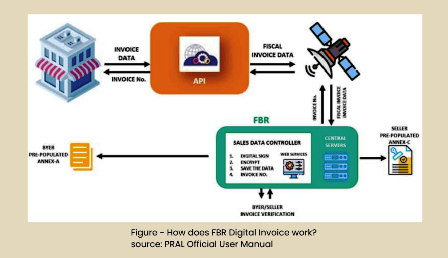
Source of above figure is PRAL official user manual.
Let’s understand, how it works in real-world implementation:
Step 1 – Integration with FBR system (starting point)
Businesses must connect their system through:
- API Integration (recommended) which is an automated real-time invoicing
- Manual invoice generation which is limited and not scalable
Integration is done via:
- PRAL (free of cost and official integrator), OR
- Any licensed integrator
Step 2 – Sandbox testing before going live
Before real invoicing, FBR requires mandatory testing.
- You can get access to a sandbox environment
- You can submit test invoices based on business scenarios
- Each scenario must be successfully validated before final implementation (recommended)
Examples of scenarios you can test without any fear:
- Sale to registered buyer
- Sale to unregistered customer
- Exempt goods
- Reduced rate items
- Services or telecom invoices
At least one valid invoice per scenario is required
Step 3 – Production activation
Once testing is completed
- Fiscal system issues a Production Token
- Your system is switched to live mode
- Real-time invoice transmission starts
Step 4 – Real-time invoice submission via API
Every invoice:
- Is generated in your ERP / POS
- Sent to the fiscal server via API
- Validated instantly
- Assigned a unique FBR invoice number
If the invoice is invalid:
- System returns error codes
Invoice must be corrected and resubmitted
Step 5 – Generating your invoice
Each invoice must include structured fields like:
- Seller NTN and name
- Buyer NTN (if registered)
- HS Code (product classification)
- Tax rates
- Sales value
- Sales tax amount
- Sale type (critical for validation)
Before submitting invoices in JSON format, above fields are mandatory.
Step 6 – Here is your electronic invoice
Once validated:
- Invoice is stored in FBR system
- QR code and invoice number are generated
- Data flows directly into your Annexure C and Annexure A of your customer
This whole process has removed manual reporting mechanism completely.
What are scenarios in FBR digital invoicing?
Scenarios are predefined transaction templates set by the Board that ensure every invoice follows correct tax treatment. These scenarios are written in JSON.
Each scenario defines:
- Type of transaction
- Tax applicability
- Reporting structure
- Required fields
Common scenarios businesses must handle
A business can encounter these key JSON scenarios
1. Standard sales
- Sale to registered buyer
- Sale to unregistered consumer (B2C)
2. Special tax categories
- Reduced-rate goods (Eighth Schedule of Sales Tax Act 1990)
- Exempt goods (Sixth Schedule of Sales Tax Act 1990)
- Zero-rated goods including exports
3. Sector-specific scenarios
- Steel and re-rolling sector
- Telecom services
- Petroleum products
- Electricity supply
- Gas to CNG stations
4. Advanced scenarios
- 3rd Schedule goods (manufacturing retail price – based taxation)
- FED in Sales Tax mode
- Processing and conversion services
- Digital and service-based invoices
5. Retail-specific scenarios
- End-consumer sales via point of sale
- Retail-level tax application
- Reduced-rate consumer goods
Why scenarios are critical
If you use the wrong scenario:
- Your invoice will fail validation
- Tax calculation will be rejected
- FBR system will not generate invoice number
For example:
- Using normal rate instead of 3rd Schedule, you will get validation error
- Using wrong HS code, you invoice will get rejected
A Practical insight
Think of scenarios as “Tax logic templates built into the system”.
You don’t just send invoice data.
You must send correct tax logic with it.
What you need for FBR Digital Invoicing Integration
Most businesses ask this too late. They think: “Just install software and we’re done.”
That mindset is exactly why integrations fail.
Digital Invoicing is not about software. It is about connection. And that changes everything.
Let’s simplify this in real terms
You need three things working together, not just one tool.
Your existing system (ERP, POS, or billing software)
This is what you already use:
- shop POS
- distribution ERP
- invoicing software
You don’t need to replace it immediately.
But here’s the catch: If your system cannot structure invoice data properly, it will break during integration.
API integration layer (this is the real engine)
This is where compliance actually happens.
Your system must:
- convert invoice data into JSON
- send it to fiscal server in real time
- receive validation response
Without API, there is no compliance. Simple as that.
Data discipline (the silent deal-breaker)
You can have the best system and still fail. Why? Because:
- HS codes are wrong
- Sale types are mismatched
- Tax rates are inconsistent
The real truth:
You don’t need “new software.”
You need a system that can speak FBR’s language.
FBR digital invoicing compliance checklist (2026)
Let’s cut through everything.
If you’re running a business, you don’t need 10 pages of explanation.
You need to know one thing:
“Am I compliant or not?” Here’s your answer.
Setup stage
- IRIS account is active
- Business is sales tax registered
- Digital invoicing module is available
Integration stage
- Integrator selected (PRAL or private)
- Technical details submitted
- IP addresses whitelisted
System readiness
- ERP / POS connected to API
- Invoice format meets FBR structure
- Required invoice fields configured
Testing stage
- Sandbox environment accessed
- Required scenarios tested
- At least one valid invoice per scenario
Go-live stage
- Production token received
- API switched to production
- First invoice validated successfully
Ongoing compliance
- Every invoice reported in real time
- Errors monitored and fixed
- Sales tax reconciliation done
Reality check:
Missing even one of these steps means you are partially compliant. And partially compliant is actually a non-compliant.
How to start FBR digital invoicing – A Practical Integration Guide
Getting started requires both compliance setup and technical integration.
Step-by-step implementation process
Here’s a clean, practical flow you can add:
Step 1 — Registration
- Log into IRIS
- Access Digital Invoicing module
Step 2 — Choose integration partner
- PRAL (free of cost and official integrator)
- Private licensed integrator
Step 3 — Submit technical details
- ERP details
- Contact person
- Hosting information (of your ERP server)
Step 4 — IP whitelisting
- Register your ERP system IPs
- Ensure secure API communication
- Approval usually within hours
Step 5 — Sandbox testing
- Submit scenario-based invoices
- Fix validation errors
- Complete all required test cases
Step 6 — Production go-live
- Receive production token
- Switch API endpoints
- Start real-time invoicing
Step 7 — Ongoing compliance
- Monitor error logs
- Ensure all invoices are transmitted
- Maintain system uptime
How long does FBR integration actually take?
It depends on your accounting system you are currently using.
Real timelines
| Accounting system | Timeline |
| Pakistani local software and ERPs like Fast Accounts, Ouditor, Splendid Accounts, Octal Accounts and Moneypex | They are already compatible with FBR. They can be connected within 24 to 48 hours. |
| QuickBooks, Zoho Books and XERO | They are non-compatible and can’t be integrated. You have to go with a separate standalone DI integration that can take 2 to 4 days. |
| Inhouse or open-source ERP and accounting software. | If you don’t want to use standalone DI solution, you have only option to change source code of your ERP in order to integrate it with FBR. Exact timeline depends on your technical staff. |
Why some integrations fail or delay
It is not due FBR fiscal system. It fails because of:
- Poor data structure
- Unclear workflows
- Untrained staff
How to Choose the Right Integration Partner for FBR Digital Invoicing
Most businesses don’t fail at digital invoicing because of FBR. They fail because of the wrong partner. And by the time they realize this, it’s already expensive to fix.
Let’s make this simple
Choosing an integration partner is not about price. It is about accuracy, system understanding, and long-term support.
Understand what you actually need
Before choosing anyone, ask yourself:
- Are you using POS, ERP, or simple invoicing system?
- Do you need API integration or a standalone solution?
- Do you have technical staff or not?
Because:
- A retailer and a distributor need very different solutions
- A freelancer and a corporate company are not the same
PRAL vs private integrators
Here is the reality that PRAL is official integrator. It is best for:
- Small businesses
- Cost-sensitive setups
PRAL comes with challenges:
- Slower support
- Limited customization
Private integrators are best for:
- SMEs
- Retailers
- Distributors
Private integrators come with these advantages:
- Faster onboarding
- Ongoing support
- Easier issue resolution
Custom API Integration
Best for:
- SAP
- Oracle
- In-house ERP
This gives control, but it requires expertise
Check their understanding of scenarios and compliance
This is where most integrators fail. Ask them:
- How do they handle different scenarios (SN001, SN002 etc.)?
- Do they understand Annex-A and Annex-C flow?
- How do they fix validation errors?
If they can’t answer clearly, they are not ready for your business.
Look beyond “integration”
Integration is not a one-time task. Real problems start after go-live:
- invoices getting rejected
- HS code errors
- system mismatch
That’s where you need partner support.
Evaluate data handling capability
Your integration partner must help you:
- clean your master data
- structure customer records
- align tax rules
Because Bad data results in failed invoices.
Don’t choose on price alone
This is the most common mistake. Businesses choose cheapest option and they face:
- System failure
- Repeated errors
- Compliance risks
Smart mindset
You are not buying software.
You are building a compliance system.
Ask one final question that reveals everything
Before finalizing, ask the integrator “How will you handle errors after go-live?”
If the answer is vague, walk away.
Final insight
The right integration partner does three things:
- Connects your system
- Maintains your compliance
- Prevents errors before they happen
If you’re unsure which integration model fits your business, our team helps you:
- Assess your system
- Select the right approach
- And ensure smooth integration without compliance risks
Talk to our experts.
What are the biggest mistakes businesses are making?
The pattern I keep seeing:
- Businesses delay integration till last day and then they rush when commissioner issues a notice.
- Business owners try to integrate global ERPs and international software directly to save their cost.
- Staff does not know how to generate, edit and delete invoices once the integration is completed.
- Staff ignores regular reconciliation between POS reports, invoicing reports, Annex-A and Annex-C.
If the integration does not happen, this mistake will explode.
It is better to
- Start early
- Fix your messy data
- Then connect your accounting system
- And stay compliant
Most common mistakes your staff can do
Here’s something most guides won’t tell you. The real challenge is not avoiding mistakes. It is about understanding them quickly then fixing them correctly.
| Mistake | Cause | Action |
| Wrong HS code. | HS code is not provided for selected sale type. | Provide valid HS code against sale type. |
| Quantity is empty. | Quantity of sold items not entered. | Quantity is mandatory for sale of goods. |
| Buyer registration number is invalid. | Registration number is not in proper format. | Correct format is 13 digits of CNIC for unregistered buyer and it is 7 digits of NTN for registered buyer. |
| Sale type is invalid. | Sale type is not correct. | Provide valid sale type. |
An important insight
Most errors are not technical. They map wrong numbers which proliferate in Annex-C of your sales tax return.
Are These Issues Already Present in Your System?
Most problems don’t appear immediately. They build silently through incorrect data and logic.
Case example 1: Retail chain transformation
A Lahore-based retail chain integrated FBR digital invoicing across 12 outlets.
Before
- Manual reconciliation
- Frequent audit notices
- Revenue mismatch issues
After integration
- Real-time reporting
- Automated tax filings
- Clean audit history
Result:
30% reduction in compliance workload and better cash visibility.
Case example 2: Distributor going digital too late
A Rawalpindi based distributor delayed integration.
Outcome
- Fines for manual invoices
- POS mismatch with FBR data
- Temporary operational disruption
Lesson:
Late compliance costs more than early setup.
Case example 3: Global EPRs and International accounting software
I received a query from one of my clients, “I am using QuickBooks (QB) for my shipping agency. Will invoicing module of QB work with digital invoicing?”
I replied, “No, it won’t work” I gave him a solution i.e. use a standalone DI solution for his invoicing system for the Pakistani market and keep on using QB for his international clients. I recommended this solution because QB does not understand and accommodate local taxation in its ecosystem.
Here, my team had an additional task for combining the sales figures from both QB and standalone DI software.
Let’s see in details how to bridge gap between global tools and Pakistan fiscal system in coming sections.
International ERPs, POS and Accounting Software are not compatible with Digital Invoicing
These are the major ERPs and accounting solutions that don’t work:
- QuickBooks
- XERO
- Zoho Books
- Odoo
- SAP, Oracle and many others
Remember
QuickBooks, XERO and Zoho Books can’t be integrated using any method you try. Oracle, SAP, Odoo and other ERPs can work with DI module using FBR custom API and JSON.
Why international ERPs and accounting solutions are not directly compatible
Due to below mentioned reasons, international ERPs, POS and software does not work with the fiscal system of Pakistan.
- ERPs, QuickBooks, XERO and Zoho Books are not designed for Pakistani taxation.
- Electronic invoicing works on JSON that varies with different scenarios like sales tax exempted services / goods, reduced rate supplies etc.
- HS code validation is required in real-time. In Pakistan, HS code system is little bit different from the global one.
- Our fiscal system demands ERPs and POS for the real-time API posting
- Usually, global ERPs don’t follow FBR specific invoice fields
Practical Solutions for Integration – Market based practice
| Solution | Businesses | Process |
| Custom API integration | Using SAP, Oracle, Odoo and other ERPs. | Build a bridging tool that will connect ERP to FBR API and handle JSON transformation for the variety of scenarios. Without any bridging tools, a standalone DI integration service will save your time and cost. |
| Custom API integration | Using inhouse or open-source ERPs and customized accounting software. | Change in the source code of ERP, POS and accounting software to make it compatible with fiscal system. Without changing source code, a standalone DI integration service will save your time and cost. |
| Local ERPs, POS and accounting software | Using Pakistani ERPs, POS and accounting software like Moneypex, Splendid Accounts, Fast Accounts, Ouditor and many others. | They are already compatible with local fiscal ecosystem. |
How much does FBR digital invoicing actually cost?
This is the question no one answers properly.
Let’s fix that.
| Options | Suitable for | Price range (depending on market insights) |
| PRAL as official integrator | Small businesses Startup But you still need technical effort. | Free of cost |
| Private integrators | SMEs, retailers, distributors, wholesalers, ecommerce stores, software houses and growing businesses | One-time: PKR 18,000 – 35,000 Monthly: PKR 5,000 – 10,000 |
| Custom integration | Enterprise solution for SAP and Oracle users | One-time: More than PKR 200,000 Monthly: PKR 30,000 – 50,000 |
Hidden costs (this is where it gets real)
Most businesses don’t budget for:
- fixing messy data of customers
- staff training
- handling errors
- ongoing system monitoring
Digital invoicing for e-commerce and online businesses
If you run an online business, read this carefully. Because most people ignore this completely.
DI applies to you even if you:
- sell through website in Pakistan.
- run Shopify store for local customers.
- operate on daraz.pk.
- offer online services to Pakistani clients.
What FBR expects
Every sale must:
- generate invoice automatically
- be recorded in your system
- be sent to FBR in real time
What this means practically
Your system must:
- connect your website to fiscal invoicing system
- trigger invoice at checkout
- send it through FBR API instantly
A Reality check
Manual Excel tracking?
Not acceptable anymore.
Biggest mistake online businesses make
They think: “We’ll handle invoicing later” That doesn’t work anymore.
Because the ultimate compliance is to connect your invoicing with FBR in real-time and file your monthly sales tax returns timely.
What should you do next as a business owner?
The best approach is to treat electronic invoicing as a business transformation project, not just a tax requirement.
Priority actions:
- Confirm your compliance status
- Audit your current invoicing process
- Choose a reliable integration partner
- Train your finance and operations teams
The future of digital compliance in Pakistan
Digital invoicing is just the beginning.
FBR is moving toward:
- Real-time tax reporting across sectors
- Integration with bank data
- AI-driven audit systems in income tax and sales tax
- End-to-end digital tax ecosystems
This means one thing:
Compliance will become embedded into daily operations, not an end-of-month task.
Final thoughts: The shift you cannot ignore
The truth is simple:
FBR digital invoicing is not just about compliance. It is about transforming businesses into a more transparent and disciplined model.
Handled poorly, it creates risk.
Handled well, it creates control.
What comes next?
If your business is still unsure where it stands, now is the time to act.
Start with a simple question:
Is every invoice your business issues visible to FBR in real time today?
If the answer is no, your next move matters more than ever
Is your invoicing system FBR-compliant today?
If the answer is no, you are at risk.
We help businesses:
- Integrate systems
- Fix compliance gaps
- Prepare for audits
If You Implement This Without Checking Your System…
You may follow the rules correctly but still create compliance issues inside your system.
Frequently Asked Questions
What is FBR Digital Invoicing in simple terms?
FBR Digital Invoicing is a system where every sales invoice is sent to FBR centralized fiscal system in real time through API integration. Each invoice is validated and assigned an official FBR invoice number before it becomes legally valid.
Who must integrate with FBR Digital Invoicing?
All sales tax and income tax registered businesses, including retailers, distributors, service providers, and e-commerce sellers, are required to integrate their invoicing system with FBR.
How much does FBR Digital Invoicing cost?
It depends on your setup. PRAL is free of cost. Private integrators charge from PKR 18,000 to 35,000 one time along with monthly maintenance charges. Custom ERP integration cost more than PKR 200,000.
What happens if I miss the deadline?
You may face heavy fines starting from PKR 500,000, FBR notices and audits including risk of business closure in extreme cases.
Can I edit a digital invoice after submission?
Yes. You can edit or delete invoices within 72 hours. After that, approval from FBR is required.
What is an IRN (Invoice Reference Number)?
IRN is a unique number generated by FBR for each validated invoice. It confirms the invoice is officially recorded.
Do I have to use PRAL?
No. PRAL is optional. You can use any licensed integrator or develop custom API integration.
What is the difference between sandbox and production mode?
Sandbox is used for testing invoices. Production is used for live invoice submission.
Does FBR Digital Invoicing apply to exports?
Yes. Export invoices must also be reported under applicable zero-rated or special scenarios.
What if the FBR system is down?
You should store invoices in your system and submit them once the system is restored. Maintaining records is critical.
References and Sources
This guide has been cross-checked with:
- SRO 69(I)/2025 – Chapter XIV of the Sales Tax Rules 2006
- SROs 709(I)/2025, 1413(I)/2025, 1852(I)/2025
- Sales Tax Act 1990 (Sections 23 and 33)
- PRAL Technical Documentation (Version 1.12)
- JSON Scenario Files for Sandbox Testing
- FBR Official Digital Invoicing Guidelines
- User Manual (Version 1.6)
- Error Message & API Response Guide
Download Official FBR Digital Invoicing Resources
If you want to understand digital invoicing beyond basics, you should not rely only on blogs.
The real clarity comes from official documentation.
We have compiled all important resources in one place:
- Technical documentation
- JSON scenario file
- User manual
- Error messages guide
- FBR official regulations
Access them here:
Download FBR Digital Invoicing Resources
Disclaimer
This article is intended for informational purposes only. While every effort has been made to ensure accuracy based on applicable laws, SROs, and official documentation, tax regulations in Pakistan are subject to change.
Businesses are advised to consult qualified tax professionals before making any compliance or integration decisions. The examples and cost estimates provided are based on general market practices and may vary depending on business size, system complexity, and integration partner.